

Fast to Explore
Move from a wallpaper idea to a finished background in a few steps instead of building it manually.
Initializing dashboard...
Create desktop and mobile wallpapers with AI. Use a prompt, pick a style preset, or guide the result with a reference image.

An AI wallpaper generator helps you create screen-ready backgrounds for desktop and mobile devices without a complicated design workflow. You can describe the idea in a prompt, choose a style preset, or upload a reference image to guide the look, then generate a polished wallpaper that fits your screen.
Create wallpaper concepts that feel polished, fit your screen, and stay easy to control.
Move from a wallpaper idea to a finished background in a few steps instead of building it manually.
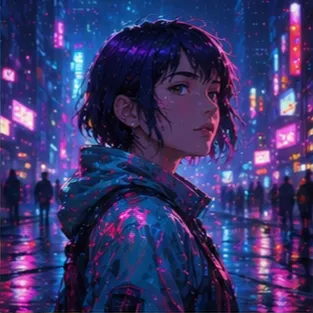
Pick a preset style when you want a quick direction, or upload a reference image when you want the result to follow an existing visual idea.

Generate wallpapers that are easier to use on desktop and mobile without awkward cropping or extra editing.
A flexible tool for creating wallpapers that work across screens.
Make a background for a laptop or monitor that feels intentional instead of generic.
Create a phone wallpaper with the right mood, spacing, and composition for a smaller screen.
Generate a background that matches a personal aesthetic, a creator brand, or a visual theme.
Describe the wallpaper, choose a style preset or reference image, then generate a background that fits your screen.
Describe the wallpaper idea, mood, subject, and colors you want the image to capture.
Pick a style preset or upload a reference image, then choose the aspect ratio that fits your device.
Create the wallpaper, review the result, and download a screen-ready background you can use right away.
"I used AI Wallpaper Generator to make a calmer desktop background that matched the colors I wanted instead of browsing through generic packs."

Desktop Customizer
"AI Wallpaper Generator makes it easy to switch between styles or use a reference image when I want my phone wallpaper to follow a specific look."

Phone User
"I use it for backgrounds that match my channel colors without feeling like stock wallpaper."

Streamer
"Changing the prompt or switching to a reference image gives me a faster way to get a wallpaper that feels deliberate rather than busy."

Creative Lead
"The aspect ratio control is useful because I can make one idea work for both desktop screenshots and phone mockups."
App Reviewer
"I like using it when I want a wallpaper that matches a very specific mood rather than another generic abstract background."

Visual Designer
Create a custom wallpaper with a prompt, a style preset, or a reference image.
Create WallpaperCommon questions about creating desktop and mobile wallpapers with presets or reference images.
It turns your wallpaper prompt into a screen-ready image with balanced composition, color harmony, and either a selected style preset or a reference image.
Describe the scene, mood, colors, and subject you want. Then choose a style such as Minimalist, Nature, Anime, Cyberpunk, Aesthetic, Dark, Calming, or Surreal, or switch to a reference image if you already have a visual direction.
Yes. Small prompt changes can produce noticeably different results, which is useful when you want to compare a few wallpaper directions before choosing one.
Yes. You can switch to the reference mode, upload an image, and let it guide the wallpaper while still keeping the result screen-ready.
Yes. The aspect ratio control makes it easier to create wallpapers for desktop, phone, and lock screen use without awkward cropping.
No. A simple description of the wallpaper idea is enough. The style presets and reference image mode help you shape the result without a complicated prompt.